


What are the design tips for creating cartoon stickers for digital printing?
Hey there! As a supplier of cartoon sticker digital printing, I've got a ton of experience in this field. Today, I'm gonna share some awesome design tips that'll help you create killer cartoon stickers for digital printing.
1. Understand Your Audience
First things first, you need to know who you're making these stickers for. Are they for kids, teenagers, or adults? Different age groups have different tastes. For example, kids usually love bright colors, cute characters, and simple designs. Think of those classic cartoon characters like Mickey Mouse or Peppa Pig. Their designs are straightforward and full of vibrant hues that immediately catch a child's eye.
On the other hand, teenagers might be more into edgier, trendy designs. Maybe some cool anime - style characters or stickers with popular internet memes. Adults, meanwhile, could appreciate more sophisticated or humorous designs. If you're targeting a specific niche, like gamers, you'll want to incorporate game - related elements such as controllers, power - ups, or famous game characters. Understanding your audience is the foundation of a successful sticker design.
2. Keep It Simple
When it comes to digital printing, simplicity is key. Complex designs with too many details can get lost in the printing process. High - resolution printers can handle a lot, but overly intricate patterns might result in a blurry or pixelated final product. Stick to clean lines and bold shapes. For instance, if you're designing a cartoon animal, don't try to add every single hair or feather. Instead, focus on the main features that make the animal recognizable.
A good example is the Hello Kitty design. It's just a simple white cat with a red bow, yet it's one of the most recognizable cartoon characters in the world. This simplicity makes it perfect for digital printing, as it can be reproduced clearly on various sticker materials.
3. Choose the Right Colors
Colors play a huge role in the success of your cartoon stickers. They can evoke emotions, set the mood, and make your stickers stand out. Use a limited color palette to keep the design cohesive. Too many colors can make the sticker look chaotic.
Bright and primary colors are always a safe bet, especially for designs targeting younger audiences. They're eye - catching and can convey a sense of fun and energy. However, if you're going for a more sophisticated look, you might want to use muted or pastel colors. For example, a sticker with a soft pink, lavender, and mint green color scheme can give a very calming and elegant vibe.
Also, consider the color contrast. Make sure there's enough difference between the foreground and background colors so that the design is easy to see. You don't want your cute cartoon character to blend in with the background.
4. Add Personality
Your cartoon stickers should have personality. This is what will make them unique and appealing to your target audience. Give your characters funny expressions, quirky poses, or interesting accessories. For example, you could design a cartoon dog wearing a pair of sunglasses and a beach hat, looking like it's ready for a vacation.
You can also add some text to your stickers to give them an extra dose of personality. A funny one - liner or a motivational quote can make your stickers more engaging. Just make sure the text is easy to read and doesn't overpower the main design.
5. Consider the Sticker Shape
The shape of your sticker can add another layer of creativity to your design. While rectangular and square stickers are the most common, you can think outside the box (literally). Circular, oval, or even irregularly shaped stickers can make your designs more interesting.
For example, if you're designing a sticker of a pizza slice, you could cut the sticker in the shape of a pizza slice. This not only makes the sticker more visually appealing but also enhances the overall theme. When choosing the shape, keep in mind the practicality of the sticker. It should be easy to apply and not too difficult to handle.
6. Think About the Printing Material
Different printing materials can affect how your design looks. There are various options available, such as paper, vinyl, and PVC. Each material has its own characteristics.
Paper stickers are usually the most affordable option. They're great for short - term use or for designs that don't need to be very durable. However, they're not waterproof and can easily tear.
Vinyl stickers, on the other hand, are more durable and waterproof. They're perfect for outdoor use or for items that might get wet, like water bottles. PVC stickers are also very durable and have a shiny finish, which can make your designs look more professional.
When designing your stickers, consider the material you'll be printing on. For example, if you're using a shiny material like PVC, you might want to avoid using too many reflective colors in your design, as it could cause glare.
7. Test Your Design
Before you go ahead with a large - scale print, it's a good idea to test your design. Print a small batch of stickers on the actual material you plan to use. This will allow you to see how the colors look, if the details are clear, and if the overall design meets your expectations.
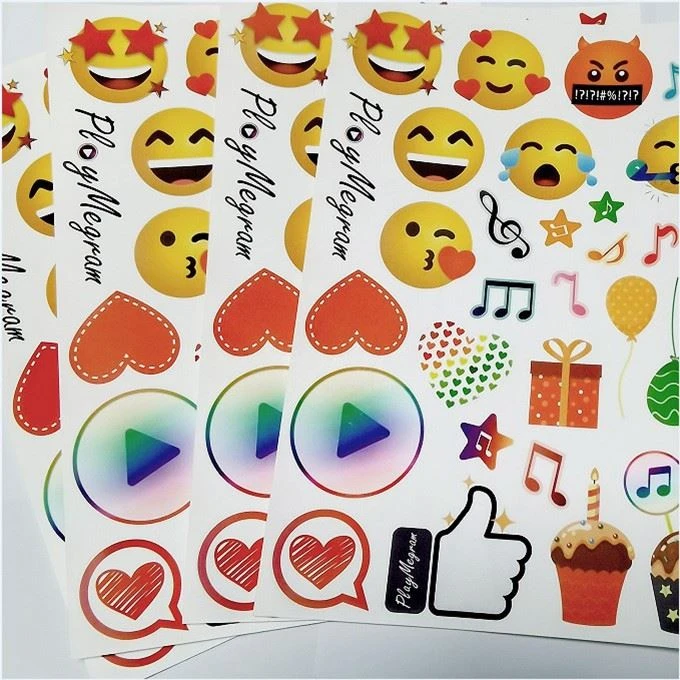

You can also get feedback from others. Show your test stickers to friends, family, or potential customers. They might have some valuable insights or suggestions for improvement. Based on the feedback, you can make any necessary adjustments to your design.
8. Explore Different Styles
There are countless cartoon styles out there, from traditional hand - drawn to modern digital styles. Don't be afraid to experiment and find the style that suits your brand and target audience.
For example, if you're going for a more retro look, you could use a style similar to the classic Looney Tunes cartoons. If you want a more contemporary feel, you might try a flat - design style, which is very popular in today's digital world.
You can also combine different styles to create something truly unique. For instance, you could blend a hand - drawn character with a digital background.
9. Check for Copyright Issues
Make sure your design doesn't infringe on any copyrights. If you're using elements like characters, images, or fonts that are protected by copyright, you could face legal issues. Use your own original ideas or get proper licenses for any copyrighted materials you want to incorporate into your design.
There are many free and royalty - free resources available online, such as stock images and fonts. These can be a great way to add some extra elements to your design without worrying about copyright problems.
10. Use Online Tools
There are plenty of online design tools that can help you create amazing cartoon stickers. Tools like Canva, Adobe Illustrator, and Inkscape are popular choices. They offer a wide range of features, from basic shape drawing to advanced image editing.
Canva, in particular, is very user - friendly and has a lot of pre - made templates that you can customize. It's a great option for beginners who don't have a lot of design experience. Adobe Illustrator, on the other hand, is more powerful and is often used by professional designers. It allows for more precise control over your design.
If you're interested in DIYing your cartoon sticker digital printing, check out DIY Cartoon Sticker Digital Printing. And if you need waterproof adhesive cartoon stickers, take a look at Waterproof Adhesive Cartoon Sticker Digital Print.
We're here to help you bring your cartoon sticker ideas to life. Whether you're a small business looking to create promotional stickers or an individual with a creative project, we've got the expertise and resources to make it happen. If you're interested in our cartoon sticker digital printing services, don't hesitate to reach out for a quote and start a procurement discussion.
References
- "Graphic Design for Beginners" by Jane Smith
- "The Art of Cartooning" by John Doe
- Online articles from design blogs and forums
